SXencGUI – { Mount / Unmount Encrypted Directories }
 SXencGUI is a simple application that can be used to graphically mount / unmount directories that have been encrypted with encfs. It has a simplistic user interface that is quite intuitive.
{ Program Options }
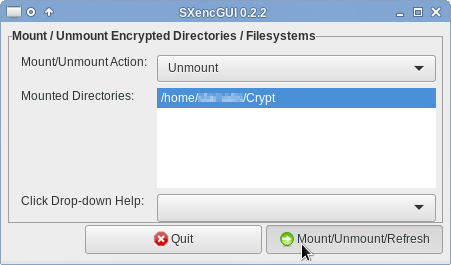
The “Action” is a drop-down that has the values of “Mount” and “Unmount”. Depending of what option is selected, the program proceeds with further choices presented to the user when the “Mount/Unmount Directory” button is pressed.
If “Mount” is selected, the user is presented with a File Selection Dialog to choose the encrypted directory to be mounted and subsequently with a second Dialog to select the mount point.
A password dialog is shown for the user to enter the password they used when setting up the encrypted directory.
Once the correct password is entered, encfs is used to mount the encrypted directory to the selected mountpoint.
To unmount a directory, simply select “Unmount”from the “Action” dropdown, then click on the List of Mounted Directories on the directory to be unmounted and click on the “Mount/Unmount Directory” button.
{ Program Setup }
This program is going to be installed by default in your $HOME/bin directory.
Move the downloaded tar file into your home directory:
mv Downloads/SXencGUI_vX.Y.Z.tar $HOME/
Expand the tar file in a terminal:
tar xf SXencGUI_vX.Y.Z.tar
By running the above command, the following happens:
- The $HOME/bin directory will be created (if it does not already exist)
- The executable shell script (SXencGUI) will be copied into $HOME/bin
- 1 (one) icon (SXencGUI.png) will be copied into $HOME/.local/share/icons
- 1 (one) desktop file (SXencGUI.desktop) will be copied into $HOME/.local/share/applications
If you have not set your $HOME/bin in the $PATH, see this page page, or this snippet in our Knowledge Base.
If you have set your path properly, you should be able to run this application either through your “Accessories” menu, or by the <Alt>+<F2> mechanism.
{ Downloads }
[insert_php]
echo(‘
- ‘);
- ‘ . basename($file2Download) .’ MD5SUM: ‘ . md5_file(“$file2Download”) . ‘
foreach(glob(“downloads/SXencGUI*.tar”) as $file2Download) {
echo(‘
‘);
}
echo(‘
‘);
[/insert_php]
{ Source Code }
{ Donation }
A small gesture goes a long way!
We would be grateful if you consider showing your appreciation of our efforts by making a donation towards future software development and the running costs of this site!